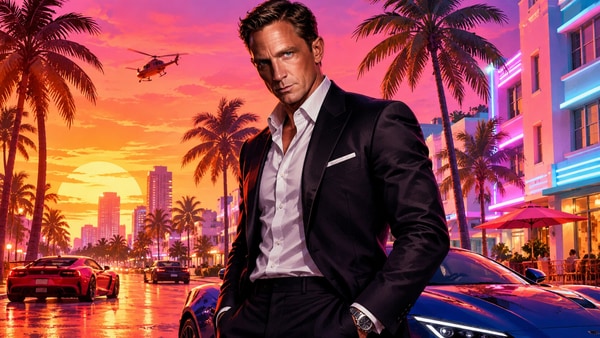
The viral craze for GTA 6 AI photos has taken over social media feeds everywhere. People love to turn normal snapshots into colorful video game portraits. Meanwhile, this fun trend captures the bright neon lights and warm sunsets of Vice City. You can join in quickly by using smart tools on your phone. Read more about trending styles to find fresh ideas for your next post. Specifically, platforms like ChatGPT make the design process very simple for everyone.
How to Use ChatGPT for Your Portraits
Transforming your favorite pictures into game art is not hard. First, you must open the app on your phone or computer. Next, upload a clear photo that shows your face well. Check our setup guide to learn the basics. After that, paste a good prompt to guide the software. Consequently, the tool will redraw your face into a cool game character. Always remember to save your new file before you post it online.
ChatGPT lets you adjust small details if you want a change. For example, you can ask the bot to alter the background or clothes. Therefore, you get a custom poster without needing heavy design skills. According to OpenAI, users retain full creative control over their uploads. However, you should always check the final output for any odd glitches.
Best Prompts for GTA 6 AI Photos
Writing a strong text prompt helps you get the best possible results. For instance, you can try a character poster prompt for your main feed. Simply ask the bot to keep your facial features intact while adding palm trees. Meanwhile, another fun option is the sunset beach portrait style. These prompts ensure your images match the famous Rockstar Games aesthetic.
Many fans also enjoy the realistic gameplay screenshot style. This choice places you right on a busy street with sports cars and bright signs. Specifically, it uses game-engine graphics to make the scene look real. Furthermore, you can ask for warm evening lighting to boost the cinematic feel. Always specify that you want no text or logos on the final picture.
Steps for Google Gemini Users
If you prefer Google tools, you can use Gemini for your edits. First, visit the official website or open the mobile app. Then, select the image generation option from the main menu. Upload your favorite photo and type a detailed request. Gemini will process your input and build a fresh image in seconds. If something looks wrong, just ask the system to fix those errors.
Just like ChatGPT, Gemini works best when you give clear instructions. For example, you can request a vertical loading screen illustration with bold outlines. Alternatively, you can ask for a neon night city backdrop with wet pavement. As a result, your pictures will stand out on Instagram and WhatsApp status feeds.
Tips for Better Results
Getting great results depends on the quality of your original image. Always pick well-lit photos where your face is easy to see. Avoid heavy filters because AI tools need clear reference data to work well. When you describe the background, be very specific about what you want. Finally, enjoy sharing your custom game posters with all your friends.
For in-depth context, see GTA VI Multigenerational Pull Threatens Hollywood Blockbusters. For in-depth context, see Artificial Intelligence Deep Dives.
Story Timeline: Google Gemini AI & Pixel Ecosystem
Track this developing story from beginning to end across all published reports in our newsroom coverage tree below.
Google releases Gemini 4 Carbon to the public with an agent swarm feature, affecting enterprise users and developers evaluating top AI platforms.
Discover how the Google Search upgrade powered by the Gemini 4 Hydrogen model improves multi-part queries, complex intent, and fast agentic execution.
Discover how the GTA 6 AI photo trend turns normal pictures into stunning Vice City art using ChatGPT and Gemini. Learn the best steps and prompts.
Learn how to use Gemini Notebook to turn your research notes and PDFs into interactive websites, study guides, and data dashboards in minutes.
Frequently Asked Questions
What are the main developments regarding GTA 6 AI photos?
Recent updates confirm key advancements and strategic moves surrounding GTA 6 AI photos, impacting industry standards and market adoption.
Why is GTA 6 AI photos significant for the market right now?
Analysts highlight that GTA 6 AI photos establishes a new benchmark for efficiency and security, driving broader institutional and consumer interest.
What should users expect next from GTA 6 AI photos?
Upcoming milestones point toward accelerated rollout schedules, feature enhancements, and continued integration across modern workflows.
What impact will this Artificial Intelligence development have over the next 12 months?
Reader poll (non-scientific). Share your perspective below or join the discussion in the comments.